[!IMPORTANT+]
This post covers a real-world security exposure I found while looking at Internet-facing infrastructure. The affected company was privately notified, and the exposure was fixed before this article was published.
All identifying details, including IP addresses, domains, company information, database names, and personal data, have been redacted.This is security research, not an invitation to poke around systems you don’t own or have permission to test. If you find something similar, minimize interaction, document only what you need, and disclose it responsibly.
I’ve been looking at Internet-exposed services recently, and one thing keeps showing up: databases that really don’t need to be there.
MongoDB is an interesting example because the problem often isn’t MongoDB itself. There doesn’t have to be a new vulnerability, an authentication bypass, or some complicated exploit chain. Sometimes somebody simply deploys a database, publishes a few ports, gets everything working, and accidentally turns internal infrastructure into an Internet service.
I found one example that demonstrates this pretty well. The server exposed MongoDB itself, but it also exposed Mongo Express, a web-based administration interface for MongoDB. More importantly, the interface wasn’t sitting in front of an empty development database. It was connected to a real application database, write access was available, and user information was visible through the interface.
The affected company was privately notified and the exposure was fixed before publication. I’ve also removed the IP address, hostname, company information, database names, user information, and other identifying details throughout the article. The interesting part isn’t who made the mistake. It’s how ordinary the mistake was.
What the Internet scan showed
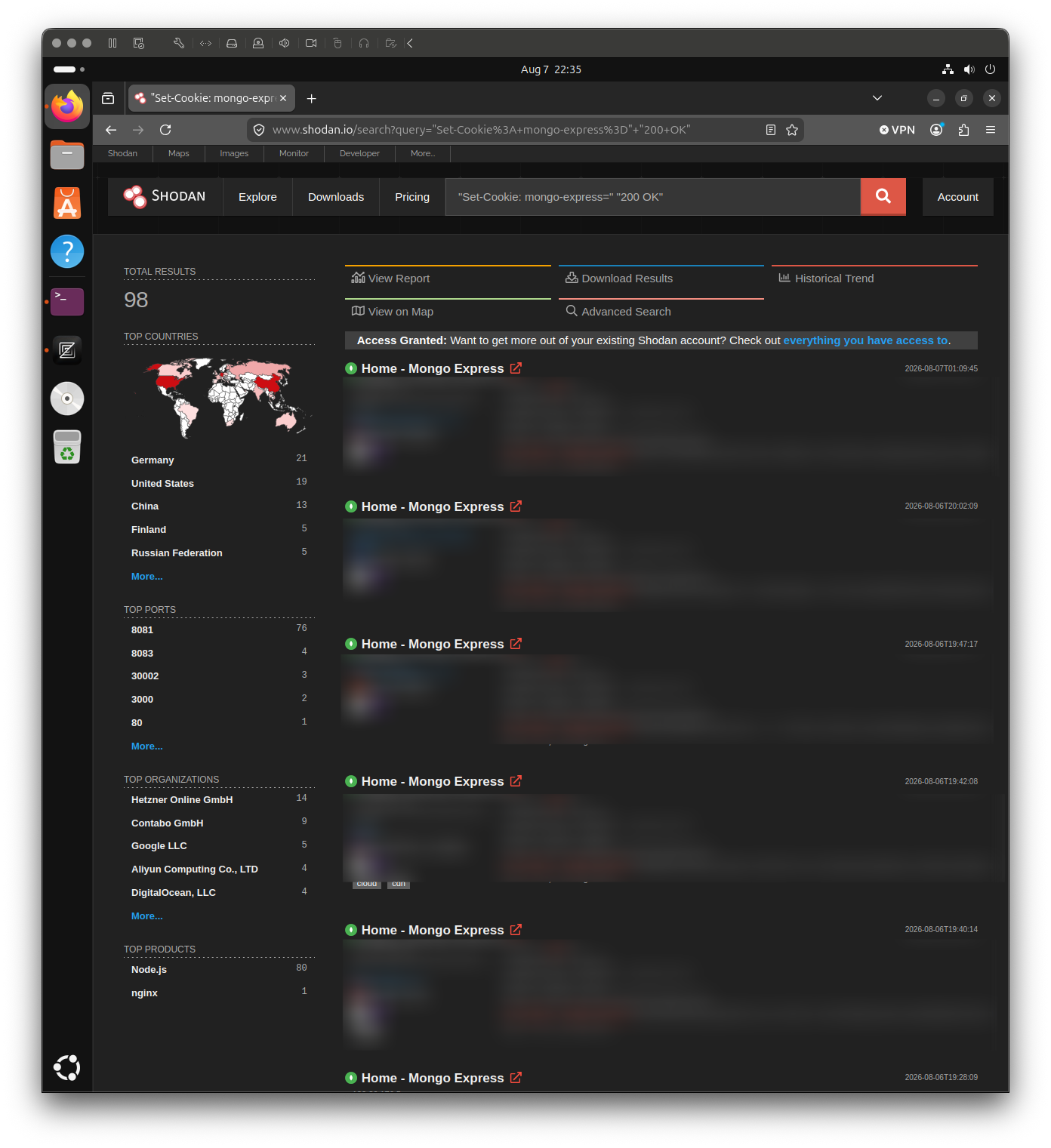
The useful thing about this case is that the server described itself before I had to do much of anything.
The original scan contained considerably more metadata. What follows is a normalized and sanitized summary of the parts relevant to this article, not literal raw scanner output:
{
    area_code: null,
    asn: "AS[REDACTED]",
    city: "[REDACTED]",
    country_code: "[REDACTED]",
    country_name: "[REDACTED]",

    data: [
        22/tcp/OpenSSH,
        8081/tcp/Node.js,
        27017/tcp/MongoDB
    ]
}
That already gives us a useful picture of the machine:
22/tcp      OpenSSH
8081/tcp    Node.js / Express
27017/tcp   MongoDB
None of these ports individually proves that something is wrong. SSH being reachable from the Internet can be completely intentional. MongoDB can technically be exposed securely too, although in most application architectures there is little reason to make it directly reachable from arbitrary Internet hosts.
What makes the combination interesting is context. There is a MongoDB server on 27017, while another HTTP service built with Node.js and Express is listening on 8081. That makes the HTTP service worth looking at, and in this case it turned out to be exactly what the combination suggested.
Port 8081 wasn’t particularly subtle
The scanner had captured the HTTP response from port 8081, so there wasn’t much guessing involved. After removing values that don’t belong in a public blog post, the response looked something like this:
HTTP/1.1 200 OK
X-Powered-By: Express
Content-Type: text/html; charset=utf-8
Set-Cookie: mongo-express=[REDACTED]; Path=/; HttpOnly
Connection: keep-alive
There are already two useful pieces of information here. X-Powered-By: Express tells us the service is running Express, and the cookie name is even more explicit:
mongo-express
The returned HTML removed whatever ambiguity remained:
<title>Home - Mongo Express</title>
At that point, there wasn’t much reason to fingerprint the service more aggressively. The application had already identified itself. There was a public Mongo Express instance on 8081, while MongoDB itself was reachable on 27017.
The externally visible architecture looked approximately like this:
                    Internet
                       |
        +--------------+--------------+
        |              |              |
        v              v              v
    OpenSSH        Mongo Express    MongoDB
    :22            :8081            :27017
This is one of the things I think gets lost in a lot of security discussions. There isn’t always a clever reconnaissance stage. Public services routinely expose useful information through headers, cookies, HTML, protocol banners, version information, and normal application behavior.
If a service is public, it’s reasonable to assume that information about it will eventually be collected.
MongoDB itself was talking too
The MongoDB service also returned build and server information.
Shodan classified the service as:
Authentication partially enabled
That is scanner-generated metadata, not a definitive audit of MongoDB’s authentication configuration, so I wouldn’t infer too much from that line alone.
The scan also identified the MongoDB version and some build details:
{
    "version": "7.0.28",
    "bits": 64,
    "storageEngines": [
        "devnull",
        "wiredTiger"
    ],
    "openssl": {
        "compiled": "OpenSSL 3.0.2",
        "running": "OpenSSL 3.0.2"
    }
}
The more useful observation is simpler: MongoDB itself was reachable from the public Internet.
That highlights an important distinction. Authentication and network exposure solve different problems. Authentication controls what somebody can do after reaching the service. Network controls determine who can reach the service in the first place.
MongoDB’s own security-hardening guidance recommends limiting database access to trusted hosts and networks. If MongoDB only needs connections from an application server, there is little benefit in allowing arbitrary Internet hosts to establish connections to port 27017 and then relying entirely on authentication to reject them.
The database should still require authentication. MongoDB documents enabling access control separately from network hardening, and that’s exactly the point: these controls complement each other rather than replace each other.
Mongo Express made the problem obvious
Opening the already-public Mongo Express interface made the situation much more concrete.
This wasn’t a generic Node.js page, a health endpoint, or an empty development instance. It was a working administration interface connected to an application database.
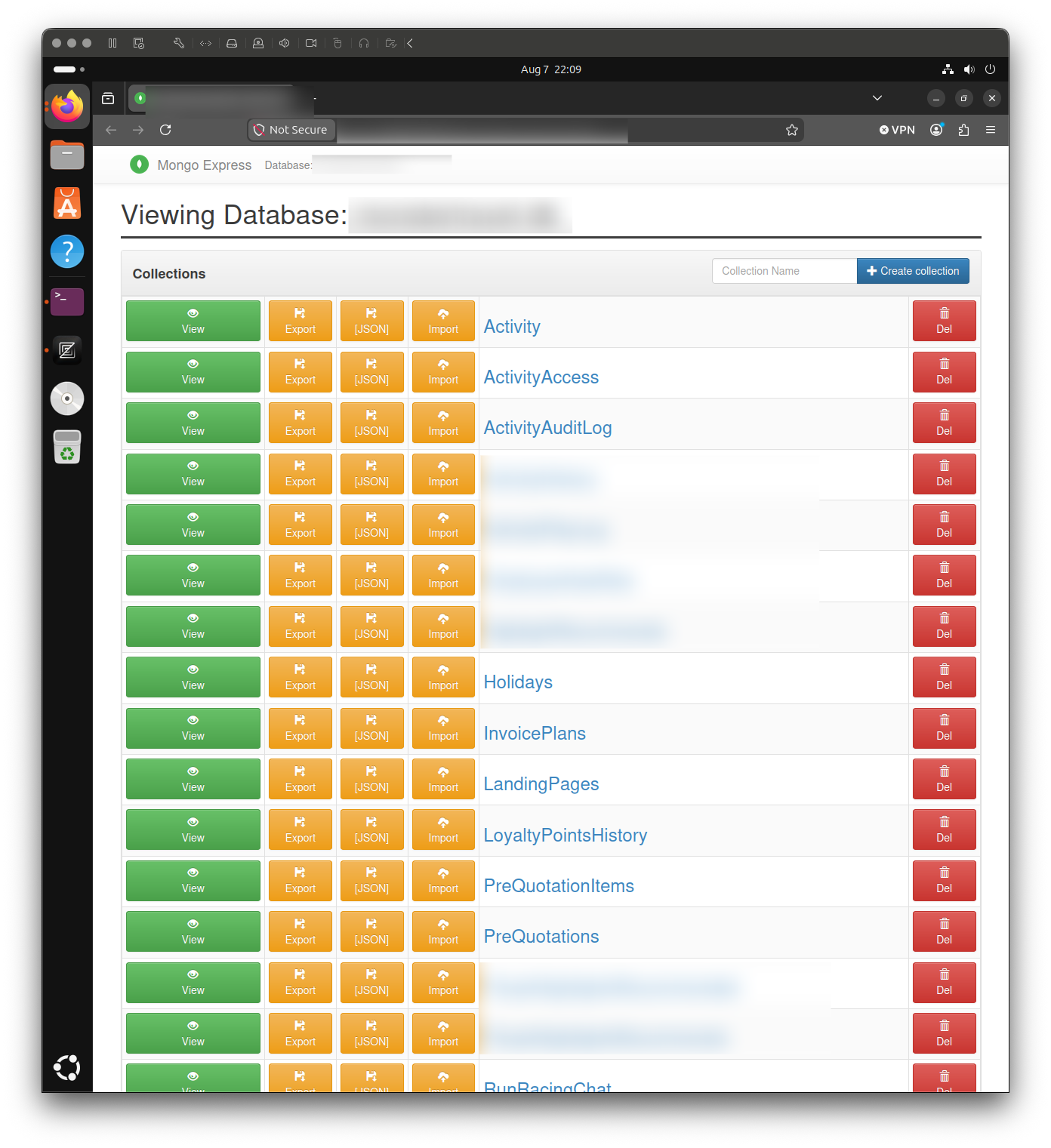
The interface exposed administrative controls. Looking at the returned page source made that explicit.
There was functionality for creating databases:
<form method="POST">
    <input
        type="text"
        id="database"
        name="database"
        placeholder="Database Name"
    >

    <button type="submit">
        Create Database
    </button>
</form>
There was also UI for deleting a database:
<form
    method="POST"
    action="/[REDACTED]"
>
    <input
        type="hidden"
        name="_method"
        value="delete"
    >

    <button
        type="button"
        class="btn btn-danger btn-block deleteButton"
    >
        Del
    </button>
</form>
Mongo Express also exposed some of its UI configuration in JavaScript:
window.ME_SETTINGS = {
    readOnly: 'false' === 'true',
    noDelete: 'false' === 'true',
    confirmDelete: 'false' === 'true'
};
Those expressions evaluate to:
readOnly      = false
noDelete      = false
confirmDelete = false
So Mongo Express wasn’t configured in its read-only UI mode, and deletion controls weren’t disabled at the UI level.
Write access to the connected MongoDB database was also confirmed. I did not test destructive operations such as deleting records or dropping databases. Once the exposure and effective write access were established, there was no useful reason to go further.
That’s the important distinction here. This wasn’t merely a database-themed dashboard accidentally left online. It was an administrative surface connected to a real application database, with write access behind it.
Then there was actual user data
The database didn’t look like a forgotten tutorial instance. It contained a fairly substantial collection structure consistent with a real application.
I’ve simplified and generalized the names here because the exact collection names aren’t important:
Activity
AuditLog
Employee
Invoice
Quotation
User
...
That already tells a different story from a database containing a couple of test collections.
The user collection made it clearer. Records contained the sort of fields you’d expect from actual application accounts:
{
    "_id": "[REDACTED]",
    "name": "[REDACTED]",
    "email": "[REDACTED]",
    "role": "[REDACTED]",
    "internalId": "[REDACTED]",
    "profileImage": "https://[REDACTED]/[REDACTED]"
}
At this point we’re no longer talking only about software versions and network configuration. There was actual user information behind the interface.
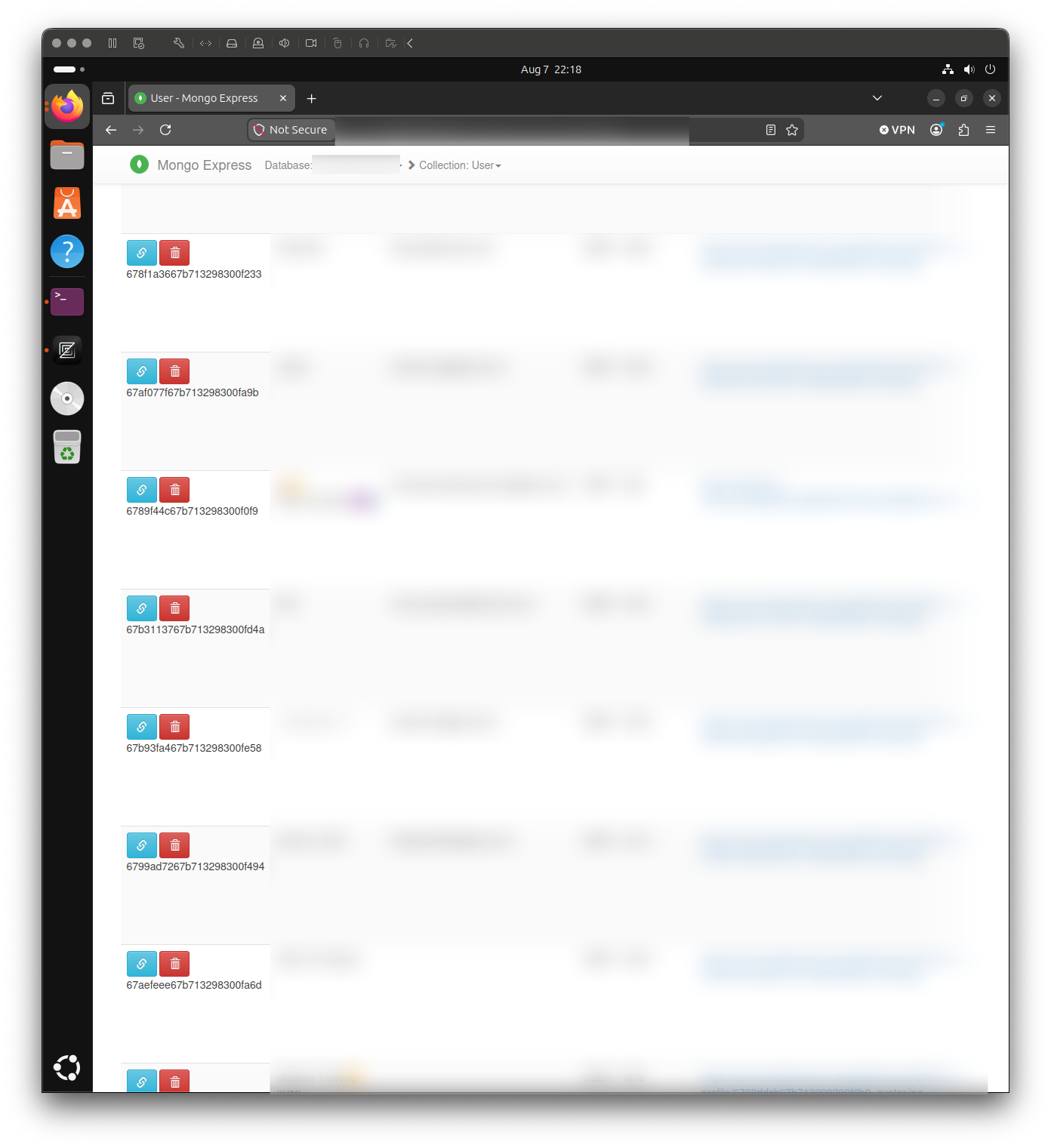
I stopped there. There is no useful security insight gained by browsing large numbers of records once you’ve already established the type of information that is exposed.
One screen was enough to understand the problem.
There was a real application behind it
The records also appeared to correspond to a real public-facing application. That matters because it makes a forgotten local test database less likely and gives context to the collections and user records.
I don’t think the identity of the application adds anything useful to the article, though. Publishing it would distract from the technical point and make the post unnecessarily actionable against a third party.
At this point, there was originally a screenshot of the application’s website. Even with the obvious details redacted, I’ve removed it completely because it could still make identifying the affected organization easier.
The affected company was privately informed about the exposure, and the issue was fixed before publication.
That’s where I want the story about the specific organization to end. The rest is about the failure mode.
The giant CVE list isn’t the interesting part
The scanner result also included a large vulns section containing vulnerability identifiers associated with software fingerprints it detected.
This is exactly where a post like this can turn into bad security content.
It’s tempting to count the entries and produce a headline about a server having dozens of vulnerabilities. The problem is that scanner-generated CVE associations are not automatically proof that each vulnerability is actually present and exploitable on a specific system.
Version fingerprints can be incomplete. Distribution packages may contain backported patches. CPE mappings can be broad. Some findings may simply not apply.
So I’m deliberately not using the CVE count as the story.
The things we can directly establish are already interesting enough:
- MongoDB was reachable from the Internet.

- Mongo Express was reachable from the Internet.

- Mongo Express was connected to an application database.

- The interface was not configured in read-only UI mode.

- Write access to the connected database was confirmed.

- Create/delete controls were exposed.

- Destructive operations were not tested.

- User information was visible through the interface.
None of that requires claiming a single CVE is exploitable.
And that’s actually the more interesting security lesson. You don’t always need a vulnerability in the software when the deployment itself gives the Internet a path to something that shouldn’t be public.
This is mostly an architecture problem
If you put everything together, the discovery path is pretty simple.
The host exposed SSH, Mongo Express, and MongoDB. Mongo Express identified itself through normal HTTP behavior. The interface was connected to an application database. User information was visible, and write access was available.
There wasn’t some elaborate exploit chain hiding between those observations. The software was mostly doing what it had been configured to do.
That’s why I don’t really see this as a MongoDB vulnerability. The more interesting failure happened one level above MongoDB and Mongo Express: architecture.
For most application deployments, the public Internet simply doesn’t need a direct path to the database or its administration interface.
A more conventional design looks something like this:
                    INTERNET
                       |
                       v
                +-------------+
                | Web / Proxy |
                +-------------+
                       |
                       v
                +-------------+
                | Application |
                +-------------+
                       |
                 PRIVATE NETWORK
                       |
                       v
                +-------------+
                |   MongoDB   |
                +-------------+
The application still talks to MongoDB. Nothing about making the database private prevents the application from working.
What disappears is the direct path from arbitrary Internet hosts to the database, which is usually exactly what you want.
Mongo Express should be treated like an admin interface
Mongo Express is useful precisely because it makes database administration convenient. That is also why I wouldn’t expose it like a normal website.
If Mongo Express only needs to be accessible locally on the server, one simple Docker configuration is to bind the published port to loopback:
services:
  mongo-express:
    ports:
      - "127.0.0.1:8081:8081"
Compare that with:
services:
  mongo-express:
    ports:
      - "8081:8081"
Docker’s own port-publishing documentation explains that published ports can be reachable outside the host by default unless they’re bound to a specific host address.
Binding to 127.0.0.1 means remote hosts can’t simply connect to the server’s public address on port 8081.
When administrative access is needed, an SSH tunnel is one option. The OpenSSH -L local forwarding option can provide a local path to the remote service:
ssh -N -L 127.0.0.1:8081:127.0.0.1:8081 admin@your-server
A VPN or private management network is another perfectly reasonable solution. The implementation depends on the environment; the principle doesn’t.
An administration interface should have an administration access path. It shouldn’t automatically inherit the same exposure as a public website.
MongoDB itself should normally be private too
The same idea applies to MongoDB on port 27017.
If the application servers are the only systems that need database access, restrict database access to those systems or their private network. MongoDB’s network configuration guidance recommends exposing database services only to trusted network interfaces and systems.
Conceptually:
ALLOW  application-network  -> mongodb:27017
DENY   public-internet      -> mongodb:27017
Then require MongoDB authentication on top of that and give applications only the permissions they actually require.
MongoDB’s users and roles documentation is a useful reference for keeping application privileges narrower than a blanket administrative account.
These controls aren’t alternatives:
Private networking
        +
Firewall rules
        +
Authentication
        +
Least privilege
        +
TLS
        +
Regular updates
Authentication protects you when somebody reaches the service. Network restrictions reduce who can reach the service in the first place. Least privilege limits what authenticated identities can do. TLS protects database traffic in transit and should be enabled especially whenever that traffic crosses a host or network boundary.
None of this is particularly exciting, which is usually a good sign.
How this happens with Docker
I suspect containers contribute to this class of mistake because publishing a port is incredibly easy.
You start with Mongo Express, can’t reach it, add the kind of mapping described in Docker’s publishing ports guide:
ports:
  - "8081:8081"
and suddenly it works.
The problem is that “it works from my laptop” and “this should be reachable from arbitrary Internet hosts” are two different requirements.
For an internal admin interface, you might instead use:
ports:
  - "127.0.0.1:8081:8081"
Or don’t publish the container port through the host at all.
The same caution applies to MongoDB. A Compose file like this deserves a second look on an Internet-facing server:
services:
  mongodb:
    image: mongo
    ports:
      - "27017:27017"
Maybe you genuinely need that mapping. But if MongoDB is only consumed by another container on the same Docker network, you may not need to publish 27017 through the host at all.
The important question isn’t whether the configuration works.
It’s:
Who can reach this after I deploy it?
Check what your own machines are actually exposing
This is fortunately one of those security problems where a basic local check gets you surprisingly far.
On Linux, start with:
sudo ss -lntup
Look for services listening on addresses such as:
0.0.0.0:27017
0.0.0.0:8081
[::]:27017
[::]:8081
A service listening on 0.0.0.0 isn’t automatically publicly reachable. A host firewall, cloud security group, router, or another network control may still block incoming traffic.
But it tells you that the process itself is prepared to accept connections through all IPv4 interfaces, which is a good reason to inspect the rest of the path.
If you’re using Docker, also check:
docker ps
and:
docker port <container>
Then check the infrastructure around the host. Depending on where you’re running, that might include cloud security groups, firewall rules, Kubernetes Services, ingress configuration, load balancers, router/NAT rules, or reverse proxies.
I like reducing the whole exercise to one question:
Who needs to connect to this port?
If the answer is “the application server,” allow the application server.
If the answer is “administrators on the VPN,” allow administrators on the VPN.
If the answer isn’t “everybody on Earth,” 0.0.0.0/0 probably isn’t the access policy you wanted.
A boring checklist that catches a lot
For a typical MongoDB-backed application, this is the sort of checklist I’d work through:
[ ] MongoDB is not unnecessarily reachable from the public Internet
[ ] MongoDB authentication is enabled
[ ] Application accounts have only the permissions they need
[ ] Mongo Express is not directly Internet-accessible
[ ] Administrative access uses SSH, VPN, or a private management network
[ ] Host firewall rules have been reviewed
[ ] Cloud security groups/firewall rules have been reviewed
[ ] Docker-published ports have been reviewed
[ ] TLS is enabled for database traffic, especially whenever traffic crosses a host or network boundary
[ ] MongoDB and Mongo Express are kept updated
[ ] Database credentials aren't committed to source control
[ ] Database credentials aren't baked into public container images
[ ] Backups exist
[ ] Backup restoration has actually been tested
[ ] Publicly reachable services are periodically inventoried
There is nothing revolutionary in that list. That’s the point.
MongoDB also maintains a production operations checklist that is worth comparing against your own setup.
Most of the security benefit here comes from not giving an attacker a network path they never needed in the first place.
“But nobody knows my IP”
Nobody needs to know your IP address beforehand.
Public IPv4 space is scanned continuously. Search engines index Internet-facing services. Bots probe common ports and protocols. Service banners, HTTP headers, TLS certificates, DNS records, cookies, and application responses all provide ways to classify what is running.
In this example, the server did a pretty good job of describing itself:
22/tcp
    OpenSSH

8081/tcp
    Node.js
    Express
    mongo-express cookie
    Mongo Express HTML

27017/tcp
    MongoDB
    version/build metadata
Security through “hopefully nobody happens to look at this address” doesn’t survive very long on an Internet where looking at addresses is automated.
If something is public, design it under the assumption that somebody will eventually notice it.
If you find something like this
There is an important line between discovering an exposed system and deciding that the exposure gives you permission to do whatever the interface allows.
It doesn’t.
I didn’t delete databases or records. I didn’t dump the database. I didn’t browse through hundreds of users. Once enough information was visible to establish the nature and impact of the exposure, there was no technical reason to keep going.
The affected company was privately notified and the exposure was fixed before I published this article.
If you find something similar, minimize interaction, preserve enough evidence to explain the issue, and find an appropriate security contact or responsible disclosure channel.
The same applies when writing about it later. You don’t need to publish customer email addresses, exact IP addresses, database names, SSH fingerprints, domains, or provider hostnames to demonstrate the issue.
A sanitized example is enough.
What I’m redacting from this post
The scan shown earlier is deliberately not the original scanner output. It is a normalized and sanitized summary.
I’ve removed or generalized information that could identify the specific system, including fields such as:
ip_str: "[REDACTED]"
asn: "AS[REDACTED]"
city: "[REDACTED]"
country_name: "[REDACTED]"
isp: "[REDACTED]"
org: "[REDACTED]"
domains: ["[REDACTED]"]
hostnames: ["[REDACTED]"]
I’m also removing SSH host keys and fingerprints, exact coordinates, session or cookie values, cluster signatures, database names, customer data, provider-specific hostnames, and other identifiers that don’t contribute to the technical explanation.
The screenshots get the same treatment. Names, email addresses, user IDs, profile images, profile URLs, IP addresses, domains, company branding, database names, and identifying collection names have been removed.
The technical lesson survives perfectly well without any of them. In fact, I think the post is better for it. The interesting subject is the failure mode, not the target.
The actual lesson
What I like about this example is how technically ordinary it is.
There was no zero-day and no elaborate exploit chain. An administration interface was reachable from the Internet, that interface was connected to a real application database, write access was available, and user information was visible.
That’s basically the whole story.
The fix is mostly ordinary infrastructure work:
Private networking
        +
restricted firewall rules
        +
authentication
        +
least privilege
        +
TLS
        +
controlled admin access
        =
much better
So if you run MongoDB somewhere, spend ten minutes looking at the deployment from the network’s point of view.
Check 27017. Check Mongo Express. Check Docker’s published ports. Check the firewall. Check your cloud security groups. Check the temporary rule somebody added three years ago because something wasn’t working and nobody wanted to debug it properly at 2 AM.
Most importantly, check what the server actually exposes instead of what the architecture diagram says it exposes.
Because sometimes the difference between an internal database administration interface and database administration as a public Internet service is one line of configuration.
And the Internet is very good at finding that line.
Cheers!
Comments